




- Perfality
- March 18, 2026
- 11:00 am
- Read Time: 5 mintues
Ask anyone who’s managed eCommerce visuals, and they’ll tell you — taking the photos is easy. What really eats up time is everything that comes after. Retouching dust marks, correcting colors, cropping to endless specs, renaming files, and exporting versions for every platform under the sun.
It’s the unglamorous part of selling online, and yet it’s where most creative teams lose hours every week. The problem isn’t that people are slow — it’s that the process is usually held together with makeshift systems and half a dozen folders named “final_v3.”
Over time, those little inefficiencies pile up. Launches get delayed. Teams burn out. And what should be a smooth content pipeline turns into a constant scramble to catch up.
Where production usually gets messy
Most brands start simple — a photographer uploads files to Drive or Dropbox, someone downloads and edits them, and another person uploads the results to the marketplace. It works fine when you’re managing a handful of products. But once you have hundreds of SKUs and multiple marketplaces, things quickly spiral.
Maybe the retoucher works from outdated files. Maybe Amazon’s white-background image gets swapped with a lifestyle shot meant for your brand store. Before you know it, there are five versions of the same image floating around — and no one’s sure which one’s correct.
What’s really missing isn’t skill or effort — it’s structure. A proper creative workflow isn’t about new tools; it’s about giving everyone a single, organized system to work from.
Building a cleaner retouching process
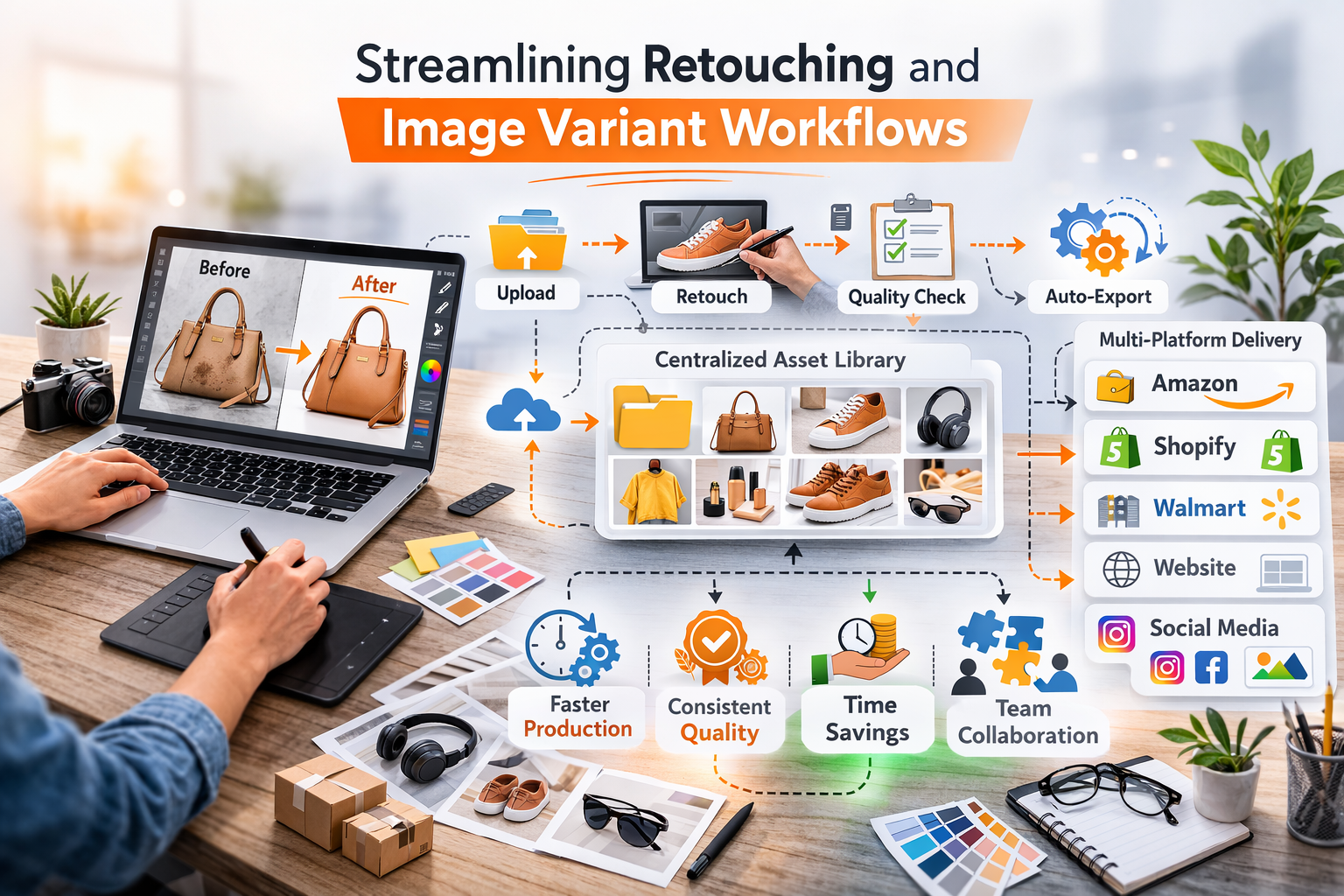
The first step is centralization. Every image — from the raw photo to the final version — should live in one shared library. When everyone can see progress in real time, there’s less confusion and fewer back-and-forth messages.
From there, create a standard checklist. For example: every photo should be color-corrected, shadows balanced, and edges cleaned before it’s approved. It sounds small, but when every editor follows the same steps, your entire catalog looks consistent — no matter who touches it.
Simplifying image variants
Creating image variants is where time disappears fastest. Amazon, Shopify, Walmart, and DTC sites all have slightly different image requirements. Resizing and exporting by hand for each one can take forever.
Instead, automate where possible. Set up templates that crop and size images automatically for each platform. Once those are built, designers can focus on creative work — not pixel math.
You’d be surprised how much faster production moves when the basics take care of themselves.
Faster doesn’t mean careless
People sometimes think that speeding up content production means cutting corners or letting quality slide. But in reality, it’s the opposite. When your team isn’t buried in repetitive edits and file naming, they finally have the space to focus on what actually makes an image great — the balance of light, the small touch-ups that make a product look real, the story that comes through in the visuals.
At Perfality, we’ve seen it happen over and over again. Once a workflow is organized and the manual grind disappears, creative teams breathe easier. They work faster without feeling rushed, and the quality naturally rises because they can give their attention to the details that matter. The process feels calmer, and the results look sharper.
Final thought
Retouching and image variations will always be part of selling online — it comes with the territory. It doesn’t have to wear your team out. When the workflow makes sense and the small, repetitive edits are handled automatically, production finally feels manageable again. The pace steadies, mistakes happen less, and everything just runs smoother.
That breathing room lets your creative team do what they do best — make visuals that actually connect with people. They’re no longer stuck fixing the same small details on repeat. Your listings stay consistent, production finally keeps up, and the whole process feels lighter. Real efficiency isn’t about rushing work; it’s about giving your team the space to do it right.