




- Perfality
- October 14, 2026
- 12:25 pm
- Read Time: 10 mintues
A new supplier gets a Home Depot buyer to say yes, loads the first fifty items, and watches forty of them bounce back with an error nobody can immediately explain. It feels like a system problem, but it almost never is. Home Depot item setup runs through a structured workflow, and the same handful of mistakes account for most of the delays.
This guide takes a different approach from a generic checklist. We follow one imaginary item from first upload to rejection to approval, so you can see exactly where it breaks and what the fix looks like. The details come from Home Depot’s own IDM onboarding guide (the 2021 edition), so confirm anything critical against the current version in your supplier portal.
How Home Depot Item Setup Works Inside IDM
IDM, short for Item Data Management, is where items sold to Home Depot in the US are created and enriched. New suppliers get access once the SBA (the supplier agreement paperwork) is complete, and the partner guardian on your account controls which users can enter data. Private brand and Home Depot-imported items start in Flex PLM instead, and the merchant team pushes them into IDM afterward.
Once an item is in IDM it moves through a fixed sequence. Knowing the sequence tells you which tab to blame when something goes wrong.
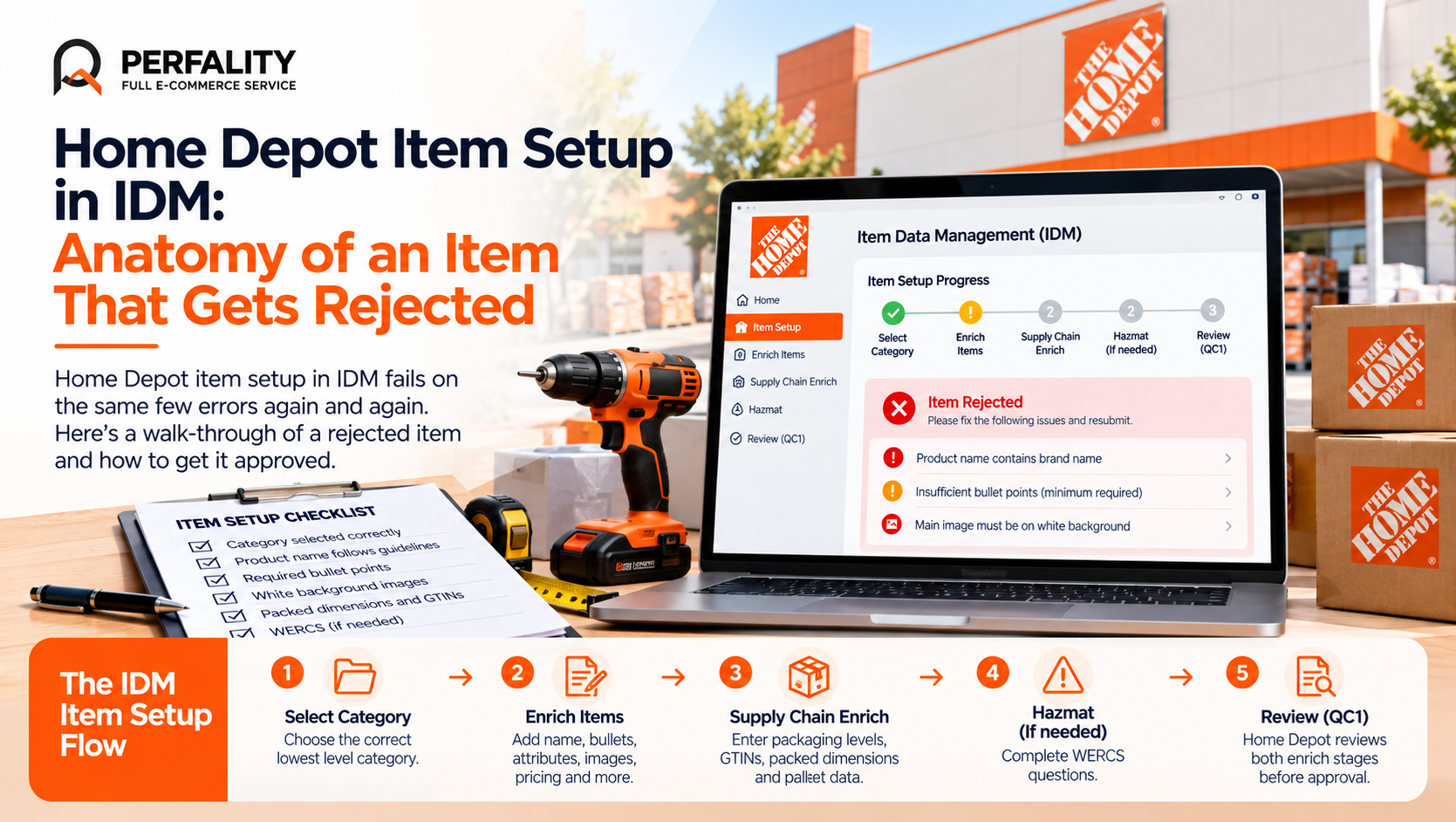
Stage | What you do | Where it usually fails |
Select category | Drill down to the lowest category level until the confirmation turns red. | Choosing a parent category, so the wrong attribute set loads. |
Enrich Items | Name, channel answers, pricing, forecast, marketing copy, bullets, attributes, images, PDFs. | Brand in the product name, too few bullets, missing images. |
Supply Chain Enrich | Packaging levels, GTINs, barcodes, packaged dimensions, pallet data. | Assembled dimensions entered instead of packed ones. |
Hazmat (if needed) | Answer the WERCS questions and register the item. | Skipping the questions, then stalling at review. |
Review (QC1) | Home Depot reviews once both enrich stages are submitted. | Submitting only one of the two enrich stages. |
A Walk-Through of One Rejected Item
Imagine a cordless drill kit from a fictional brand called Acme. The supplier fills in every field they can see and submits it with confidence. Two days later it is back in Enrich error.
The supplier opens the item, finds the core attribute called supplier process notes, and reads the rejection reason. That field is where IDM tells you what went wrong, and many new suppliers never think to look at it.
- Product name: entered as “Acme 20V Max Cordless Drill Driver Kit.” The category’s Data Standard formula does not allow the brand name in the product name, so the item fails the first review pass.
- Bullets: three entered, but the category requires a set number. IDM flags the shortfall.
- Images: the main image shows the drill on a workbench. Main images are meant to show only the product on a white background.
None of these is a hard problem. Each one is a five-minute fix once you know to look. The cost is the cycle time, because every resubmission goes back into the review queue.
The Three Rejections Behind Most Delays
Home Depot’s guide names the same three causes as the most common reasons for rejection: product name non-compliance (the top reason), too few marketing bullets, and missing images or digital assets. If you fix only those three before submitting, you remove most of the avoidable rework.
A 30-Second GTIN Fix
GTINs in IDM must be 14 digits. A 12-digit UPC needs two leading zeros, and a 13-digit EAN needs one. So the fictional UPC 012345678905 becomes 00012345678905. It sounds trivial, but a GTIN that is one digit short is a classic reason an item stalls, and it is easy to miss when a spreadsheet silently strips leading zeros.
Supply Chain Enrich: Where the Quiet Errors Start
The second tab is less visible to shoppers and more expensive when it is wrong. Every packaging level that is sold or shipped needs its own record: each (EA), inner pack (PK), case (CA) and pallet (PL). Each level needs a unique GTIN and barcode, and the each-level requires a UPC.
- Packaged dimensions describe the product as it ships, not as it looks assembled. Home Depot’s containerization tool uses them to calculate cube for every order.
- Nestable items need a nested increment value.
- Pallets need a stackable flag and a number of case layers of at least one.
Special types such as multibox items, combos and bundles, Super SKUs (color or size variations) and prepacks have their own handling, so ask Home Depot’s IDM support team before entering them as ordinary items.
Special Item Types and How They Change the Setup
Not every item is a straightforward single product. Home Depot’s guide describes several special types that behave differently in IDM, and entering them as ordinary items is a reliable way to trigger rework.
Item type | What it is | What to watch |
Multibox | One sellable item shipped in several boxes. | Each box needs its own packaging record, so the shipment matches what the customer actually receives. |
Combo or bundle | Several existing items sold together as one product. | The components must already exist as approved items. |
Super SKU | One product offered in variations such as color or size. | Variant data has to be consistent across every option. |
Prepack | A box of component items used for displays. | Imported prepacks start in Flex PLM, and a special setting must be enabled. |
If you sell any of these, raise it with Home Depot’s IDM support team before you start entering data. A short conversation up front is cheaper than rebuilding a batch.
If you suspect the root problem is wider than item setup, our list of signs your catalog needs optimization is a useful self-check before you load more items.
A Submission Checklist Before You Click Submit
- Category selected at the lowest level available
- Product name follows the Data Standard formula and contains no brand name
- Marketing copy meets the minimum sentence count and character limit
- Bullet count meets the category requirement
- Main image is JPG, at least 1000 x 1000 pixels, product only, white background
- Required PDFs such as manuals, warranty, assembly and parts documents uploaded
- GTINs are 14 digits at every packaging level
- Packaged dimensions measured from a real shipping carton
- WERCS hazmat questions answered
- Both Enrich Items and Supply Chain Enrich submitted
Planning a Realistic Timeline
Home Depot’s guide gives no overall onboarding duration, so it is worth planning rather than guessing. As a working rule, schedule at least two submit-and-correct cycles for any new batch, and check IDM every day for items in Enrich error so a rejection never sits unread for a week.
Large catalogs deserve a pilot. Submit ten representative items first, fix every error pattern you see, and only then load the rest. A pattern found at ten items costs an afternoon. The same pattern found at five hundred costs weeks.
How Perfality Helps With Home Depot Item Setup
Most item setup delays come from messy source data, not from IDM itself. Our work starts before anything is uploaded:
- Source data cleanup: UPCs, dimensions and descriptions standardized before upload. This is the same problem we describe in our piece on data standardization for marketplace catalog uploads.
- Data Standard mapping: product names, bullets and attributes built to the category formula from the start.
- Pilot batches: a small set submitted first so error patterns surface early.
- Daily error monitoring: items in Enrich error checked every day, in the spirit of a daily SKU health check.
- Packaging data verification: packaged dimensions and packaging levels checked against real cartons.
Related Services
If new items keep bouncing back from review, cleaning the source data and piloting a small batch is usually faster than correcting errors one item at a time. For the full picture of what we do for suppliers selling to The Home Depot, see our Home Depot account management service. Depending on where this issue keeps recurring, this is the kind of support that typically helps:
- Full-service Amazon management: Full Service Amazon Management, Full Service Amazon Agency, Amazon Full Service Agency, Full Service Amazon Marketing Agency, Best Full-Service Amazon Agency, Best Full Service Amazon Agency
- FBA-focused support: Amazon FBA Management Agency, Amazon FBA Agency, Amazon FBA Marketing Agency, Amazon FBA Management Service
- Listing and content optimization: Amazon Listing Optimization Services, Amazon Listing Optimization Agency, Amazon Listing Optimization Service, Amazon Product Listing Optimization Service, Amazon Product Listing Optimisation Service, Amazon Product Listing Optimisation Service USA
- Product listing services: Amazon Product Listing Service, Amazon Product Listing Service Provider, Best Amazon Product Listing Service Agency
- PPC and advertising management: Amazon PPC Management Service, Amazon PPC Management Service Agency, Best Amazon PPC Management Service, PPC Management Service For Amazon
- Account management: Best Amazon Account Management Services, Amazon Ecommerce Company
If this is a recurring pain point rather than a one-off, it’s usually worth a quick conversation. Book a free 30-minute call with our team and we’ll walk through what’s actually happening on your account.
Frequently Asked Questions
IDM, or Item Data Management, is the system where items sold to Home Depot in the US are created and enriched with product data, images, packaging and compliance information before review.
The most common causes are a product name that breaks the Data Standard, too few marketing bullets, and missing images or digital assets. The supplier process notes field on the item shows the specific reason.
Fourteen. Add two leading zeros to a 12-digit UPC or one leading zero to a 13-digit EAN.
Suppliers cannot edit them on existing items. You need to submit a ticket or contact Home Depot’s IDM support team.
Have any questions? Let’s connect!

