




- Perfality
- October 20, 2026
- 11:11 am
- Read Time: 10 mintues
A one-star review that says “did not fit” feels like a verdict on the product. Often it is a verdict on the page. The customer ordered the wrong size because the page did not make the size obvious, and no amount of replying to the review fixes that.
Treat Home Depot product reviews as a diagnostic tool rather than a scoreboard. Each complaint points to a specific cause, and most of the causes are fixable on your side. This guide organizes the common complaints by symptom, so you can go from “customers are unhappy” to “here is what to change” quickly.
What Home Depot Product Reviews Tell Suppliers
Home improvement purchases have a built-in feedback loop. The customer buys, tries to install or use the product, and then tells the next shopper how it went. That means reviews often describe the real-world experience, including problems that never show up in a spec sheet.
The goal is to separate three things: problems with the product, problems with the page, and problems with the shipment. Only the first requires a change to what you make.
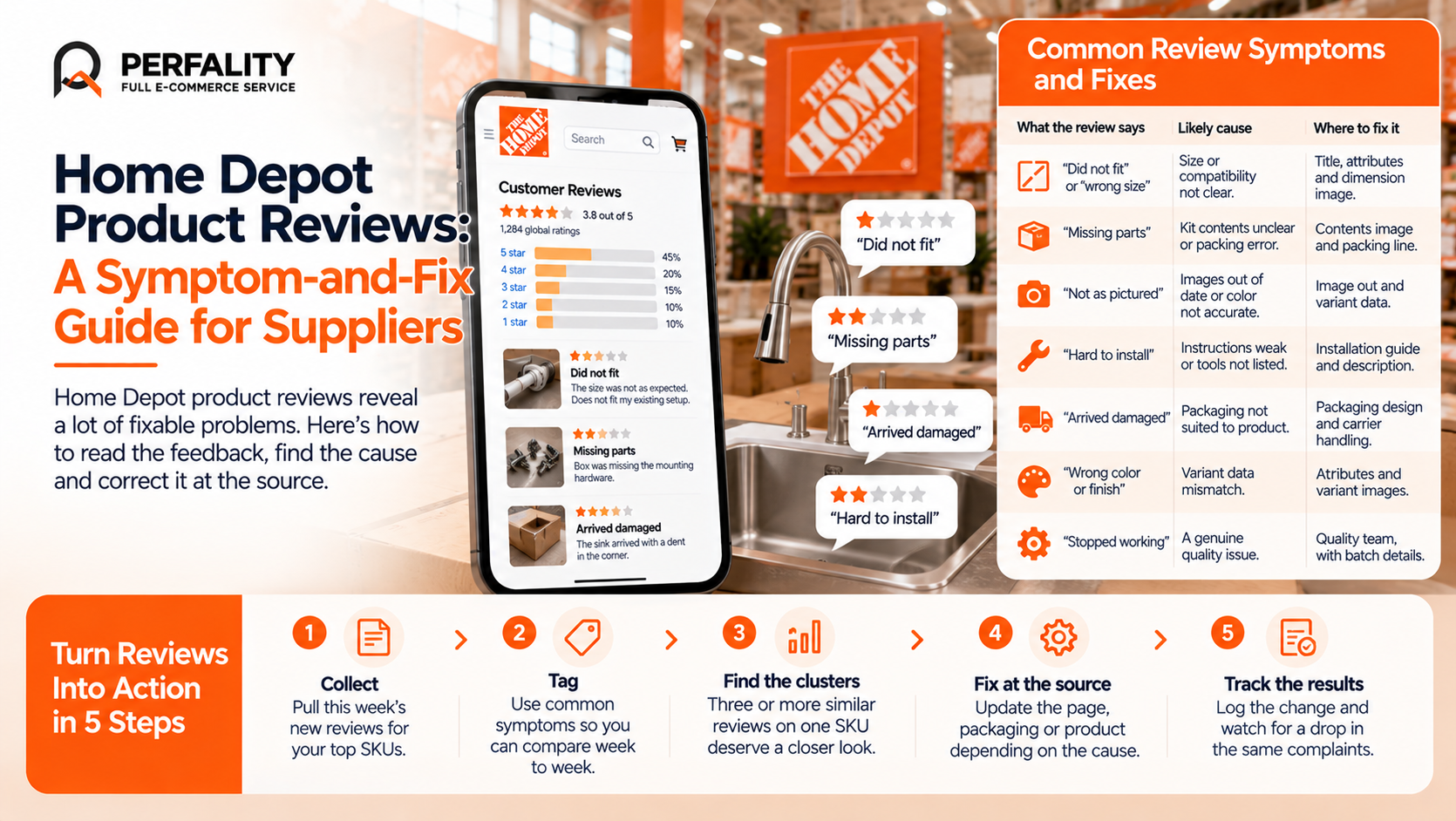
The Symptom-and-Fix Table
What the review says | Likely cause | Where to fix it |
“Did not fit” or “wrong size” | Size, thread or compatibility not clear on the page. | Title, attributes and a dimension image. |
“Missing parts” | Kit contents unclear, or an actual packing error. | Contents image and bullet, then your packing line. |
“Not as pictured” | Images out of date or color not accurate. | Image set and variant data. |
“Hard to install” | Instructions weak or tools not listed. | Installation guide and description. |
“Arrived damaged” | Packaging not suited to the product. | Packaging design and carrier handling. |
“Wrong color or finish” | Variant data mismatch. | Attributes and variant images. |
“Stopped working” | A genuine quality issue. | Quality team, with the batch details. |
A Weekly Review Routine That Takes an Hour
- Collect. Pull the week’s new reviews for your top SKUs into one sheet.
- Tag each one. Use the symptoms in the table as your tags so counts are comparable week to week.
- Count the clusters. Three or more reviews with the same tag on one SKU deserve a closer look.
- Fix at the source. Update the page, the packaging or the product depending on the cause.
- Log what changed. Note the date so you can see whether complaints fall afterward.
Example: The Compatibility Cluster
Suppose you review thirty reviews in a week for a cordless tool and nine mention compatibility. Nothing is wrong with the tool. The page never states which battery platform it uses. Adding the platform name to the title and the first bullet, and showing the battery in the contents image, often cuts that complaint within a few weeks, and it also reduces returns.
Reviews and Returns Are Two Sides of the Same Problem
A customer who returns a product often leaves a review too, and the cause is usually the same. If you look at one without the other, you miss half the story. Our guide on reducing returns is written for Amazon sellers, but the underlying approach of matching return reasons to page fixes applies to home improvement just as well.
What Not to Do With Reviews
- Do not try to influence ratings in ways the retailer’s policies do not allow.
- Do not treat every negative review as a quality defect before checking the page.
- Do not wait for a quarterly review to notice a trend that was visible in week two.
Three Review Patterns by Product Category
Different parts of a home improvement catalog attract different kinds of complaint. Knowing the usual patterns helps you read a batch of reviews faster.
- Power tools: battery compatibility, runtime, and whether accessories were included. Fix with a clear platform name and a contents image.
- Flooring and tile: color variation, coverage and installation difficulty. Fix with true-color images, a coverage calculator in the description and a plain installation guide.
- Plumbing and hardware: thread and fitting mismatches. Fix with close-up images and exact size attributes.
Using Reviews to Rewrite the Page: Before and After
Reviews are free research on what your page failed to say. Suppose several reviewers of a faucet say it was hard to install because a part was missing. Reading the page again, you realize the contents list never mentioned that a supply line is not included.
- Before: “Easy-install single-handle kitchen faucet with a modern finish.”
- After: “Single-handle kitchen faucet, 1 or 3 hole install, supply lines not included. Fits standard sinks.”
The second version is less poetic and far more useful. It sets expectations, which is exactly what reduces the complaint. This is the same philosophy behind our Content Health Project, which aligns listing content with what the product genuinely is.
A daily check also helps you notice sudden changes, such as a spike in complaints after a packaging update. Our daily SKU health check describes a simple routine for it.
How Perfality Turns Reviews Into Action
We treat customer feedback as operating data, not just a rating:
- Review collection and tagging: feedback gathered weekly and grouped by cause.
- Cause analysis: each cluster traced to the page, the packaging or the product.
- Page and content fixes: titles, attributes and images corrected where the page is the problem.
- Reporting: clear summaries built on our retail data analytics approach, including review and rating analysis.
- Routine monitoring: a recurring check so a small problem never becomes a trend.
Related Services
If the same complaints keep appearing in your reviews, a weekly tagging routine usually pinpoints the cause quickly. For the full picture of what we do for suppliers selling to The Home Depot, see our Home Depot account management service. Depending on where this issue keeps recurring, this is the kind of support that typically helps:
- Full-service Amazon management: Full Service Amazon Management, Full Service Amazon Agency, Amazon Full Service Agency, Full Service Amazon Marketing Agency, Best Full-Service Amazon Agency, Best Full Service Amazon Agency
- FBA-focused support: Amazon FBA Management Agency, Amazon FBA Agency, Amazon FBA Marketing Agency, Amazon FBA Management Service
- Listing and content optimization: Amazon Listing Optimization Services, Amazon Listing Optimization Agency, Amazon Listing Optimization Service, Amazon Product Listing Optimization Service, Amazon Product Listing Optimisation Service, Amazon Product Listing Optimisation Service USA
- Product listing services: Amazon Product Listing Service, Amazon Product Listing Service Provider, Best Amazon Product Listing Service Agency
- PPC and advertising management: Amazon PPC Management Service, Amazon PPC Management Service Agency, Best Amazon PPC Management Service, PPC Management Service For Amazon
- Account management: Best Amazon Account Management Services, Amazon Ecommerce Company
If this is a recurring pain point rather than a one-off, it’s usually worth a quick conversation. Book a free 30-minute call with our team and we’ll walk through what’s actually happening on your account.
Frequently Asked Questions
They influence buyer confidence and also reveal practical issues with fit, installation and packaging that suppliers can often fix.
No. Many complaints trace back to unclear page content, such as missing sizes or compatibility details, rather than the product itself.
Weekly is a sensible baseline for top SKUs, with faster attention for any report that suggests a safety concern.
They often share the same cause. Matching return reasons to review themes shows what to change on the page.
Have any questions? Let’s connect!

