


- Perfality
- November 2, 2026
- 11:00 am
- Read Time: 10 mintues
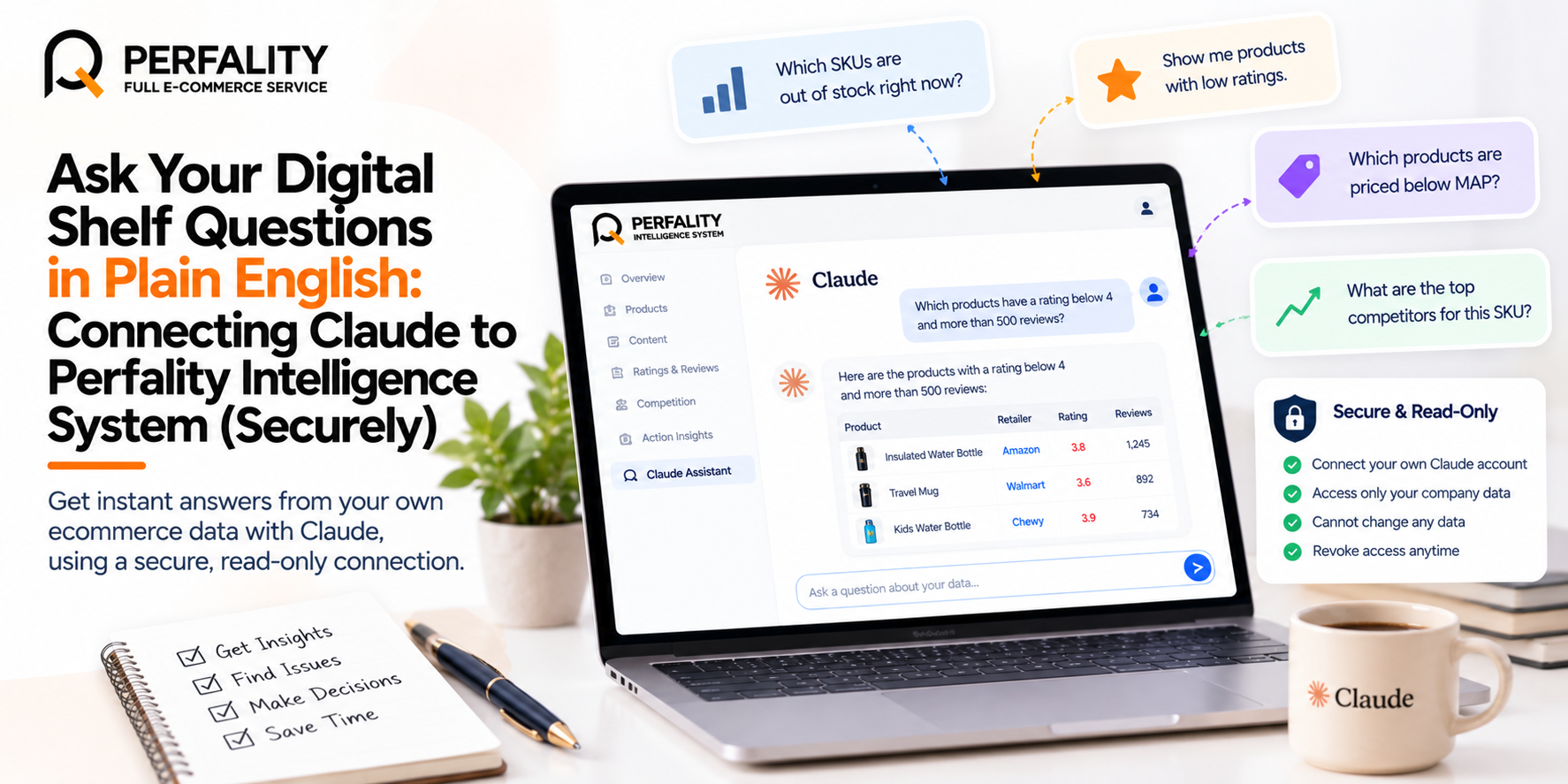
Perfality Intelligence System lets each user connect their own Claude account, so they can ask questions about their digital shelf in plain English. The connection is read-only and limited to what that person’s own login can see. Claude can look at your data but never change it, and a company user’s Claude can only ever see their own company.
Perfality Intelligence System is a digital shelf intelligence platform by Perfality that turns retailer listing data into prioritised, SKU-level actions for brands. This post explains what the Claude connector does, how to set it up and how your data stays separate.
Key takeaways
- Each user connects their own Claude account from Settings, then asks questions in plain English.
- Access is read-only, so Claude can look but not change anything.
- Access is scoped to the person’s own login, and this is enforced in the database.
- You can revoke the connection at any time from Settings.
Why are dashboards not always enough?
Dashboards are good at showing the questions someone thought of in advance. They are less good when you have a new question: which SKUs have a rating below 4 and more than 500 reviews, or which products are out of stock at one retailer right now.
Answering these usually means filtering, exporting and sorting. It is not hard, but it takes time, and it often falls to whoever is best with the tool. Asking in plain English lowers that barrier for the whole team.
It also helps people who do not work in the tool every day. A leader who wants a quick answer before a meeting can ask a question directly, without waiting for someone to build a view or export a file.
What does the Claude connector in Perfality Intelligence System do?
Perfality Intelligence System (PIS) lets each user connect their own Claude account using Claude’s custom connector feature. Once connected, you can ask Claude questions about your data and it answers from what PIS holds for your company.
Under the hood, Claude gets a small set of read-only tools: list companies, list and search products, product detail, KPI rollups and reviews. It uses them to look things up, then explains what it found.
The connection uses the same restrictions as your own login. If you cannot see something in PIS, Claude cannot see it either.
Why should you ask AI about ecommerce data?
Many teams ask AI about ecommerce data because it saves time on routine questions. When you ask AI about ecommerce data in plain English, you skip building a filter or a report first.
To ask AI about ecommerce data well, keep questions specific, such as a retailer, a category or a time window. Then ask AI about ecommerce data again to narrow the answer, and check key figures in the tool.
Here are a few ways to ask AI about ecommerce data in a read-only, scoped way:
- Ask AI about ecommerce data for one retailer at a time, such as stock problems this week.
- Ask AI about ecommerce data by category to compare average ratings.
- Ask AI about ecommerce data to list the lowest content scores, then check them in the tool.
- Ask AI about ecommerce data in follow-up steps, narrowing from a category to a SKU.
Teams that ask AI about ecommerce data this way get quick answers without building reports. Because the connector is read-only, you can ask AI about ecommerce data freely, and nothing in the data changes. Then use the tool to act on what you learn.
How do you connect Claude to PIS?
Setup takes a few clicks:
- Log in to Perfality Intelligence System with your own account.
- Open Settings, then Connect Claude, and follow the prompts to add the connector to your Claude account.
- Start asking questions in Claude.
You can revoke the connection at any time from Settings. Each person connects separately, so one colleague’s connection does not give anyone else access.
What kinds of questions can you ask?
Here are a few examples of the kind of question the connector is designed for:
- “Which of my SKUs are out of stock at Walmart?”
- “What is dragging my average rating down?”
- “Which SKUs have a rating below 4 and more than 500 reviews?”
- “What does the price and rating history of this product look like?”
- “Show me the lowest-rated reviews for this product.” (This works where review data has been supplied.)
These match the tools described above: product search and detail, KPI rollups and reviews. For a deeper look at what those numbers mean, see our Perfality Intelligence System overview.
How might different teams use it?
Because the connector reads the same loaded data you see in the tool, it suits the quick, specific questions that come up in a normal week:
- A marketplace manager can ask which SKUs are out of stock at a given retailer before the weekly meeting.
- A pricing lead can ask which products have had a large price movement.
- A content lead can ask which listings have a low rating and a high review count, to decide where to start.
- A brand or customer experience manager can ask which products are pulling the average rating down.
- An agency user can look at one brand at a time, because each company’s data is kept separate.
The answers come from the same data as the dashboards, so they should agree with what you see in the tool. If something looks off, open the product in PIS and check it there.
Why does each person connect their own account?
Each user connects their own Claude account, and the connection inherits that person’s own login permissions. That keeps access simple to reason about: whatever one person can see in PIS is the most their Claude can see.
It also means access can be managed one person at a time. If someone leaves the team or no longer needs the connector, they can revoke it from Settings without affecting anyone else.
How is your data kept separate?
Perfality Intelligence System is built so that a client can only ever see its own company’s data. Accounts are created by Perfality, so there is no public sign-up, and each client has a private login.
Company isolation is enforced in the database through row-level security. Row-level security means the database itself decides which rows a login may read, so the restriction does not depend on the interface hiding things or on Claude following instructions. A company user’s Claude connection inherits the same limit.
Numbers are never blended across companies; every view is scoped to one company. Perfality admins can see all companies, and each company’s alerts, connections and data stay separate.
What can Claude do here, and what can it not do?
It helps to be clear about the boundaries:
- Claude can look up products, product detail, KPI rollups and reviews that your login can see, and explain them in plain English.
- Claude cannot write or change anything in PIS. Access is strictly read-only.
- Claude can spot patterns across SKUs, such as which category has the lowest average rating.
- Claude is only as current as the loaded data. The data is crawled in batches and loaded by the Perfality team, so answers reflect the latest load, not a live feed.
- Review sentiment follows star ratings. One to two stars count as negative, three as neutral and four to five as positive, and review data is a client-supplied sample rather than necessarily every review.
The connector is the only AI in PIS. The suggested actions in Action Insights remain rules-based, which we explain in our guide to the digital shelf action plan. As with any assistant, check important numbers in the tool before you act on them.
To learn how Perfality supports brands across retailers, see our marketplace management services.
Why ask AI about ecommerce data alongside Amazon services?
When you ask AI about ecommerce data, the answers are only useful if someone acts on them. A brand with an Amazon FBA management agency, an Amazon FBA agency or an Amazon FBA marketing agency can ask Claude which SKUs have the weakest content, then pass that list on.
Perfality works as a full service Amazon agency. Full service Amazon management can start from an answer such as “which SKUs lost the buy box this week?”. An Amazon FBA management service or an Amazon full service agency can then take the next step.
Brands comparing the best Amazon account management services, the best full-service Amazon agency or the best full service Amazon agency can ask each provider how it reads data. A full service Amazon marketing agency should be able to explain it simply.
Questions about listings are a natural fit. Amazon listing optimization services, an Amazon listing optimization agency or an Amazon listing optimization service can start from “which listings score lowest?”. An Amazon product listing optimization service, an Amazon product listing service, an Amazon product listing service provider or the best Amazon product listing service agency can use the same answer.
The same applies to an Amazon product listing optimisation service and an Amazon product listing optimisation service USA. An Amazon ecommerce company can also ask Claude about ratings by category, then plan the next round of listing work.
For ads, an Amazon PPC management service, an Amazon PPC management service agency or the best Amazon PPC management service can use stock and price answers to protect budgets. Any PPC management service for Amazon will ask the same questions. Claude’s access is read-only, so it answers; it does not change data.
No. The connection is strictly read-only. Claude can look at data but cannot write or change anything.
Log in to PIS, open Settings, choose Connect Claude and follow the prompts. It uses Claude’s custom connector feature and takes a few clicks.
Yes. You can revoke the connection at any time from Settings.
No. Data is crawled in batches and loaded by the Perfality team, so Claude answers from the latest load.
Yes. Each client has a private login and can see only its own company’s data. This is enforced at the database level.
No. Suggested actions in Action Insights come from fixed rules applied to real data. Claude is used only to answer your questions, read-only.
Have any questions? Let’s connect!