




- Perfality
- October 26, 2026
- 11:00 am
- Read Time: 10 mintues
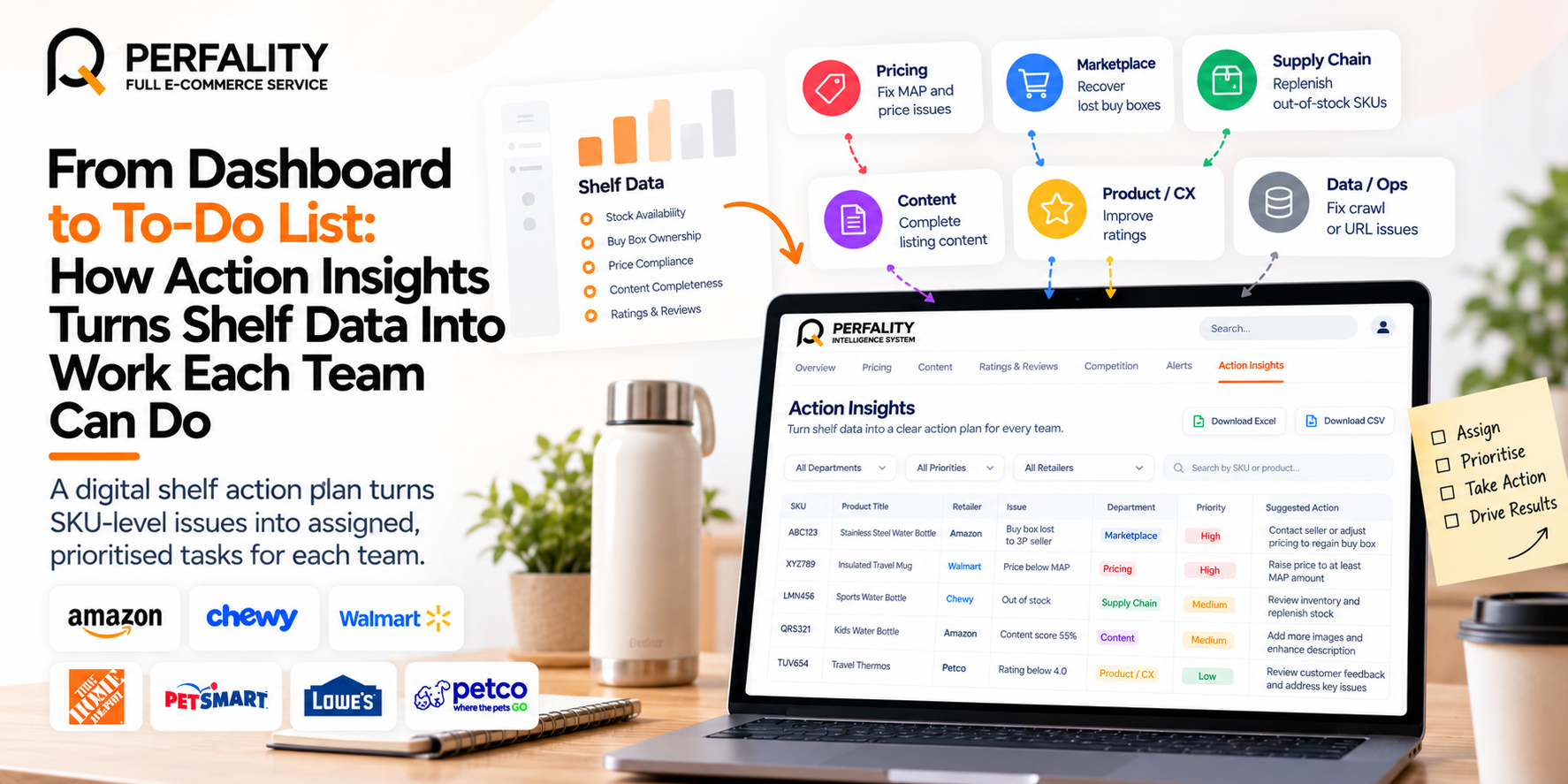
A digital shelf action plan turns data into assigned work: one row per SKU and problem, each with a department owner, a priority and a suggested next step. In Perfality Intelligence System, the Action Insights page builds that list automatically from your tracked listing data and lets you download it as Excel or CSV.
Perfality Intelligence System is a digital shelf intelligence platform by Perfality that turns retailer listing data into prioritised, SKU-level actions for brands. This post explains how the action list is built and how teams can use it.
Key takeaways
- Dashboards show problems. A digital shelf action plan assigns them.
- Action Insights creates one row per SKU and issue, grouped by department.
- Priority is set by how many tracked SKUs an issue affects: High above 15%, Medium 5 to 15%, Low up to 5%.
- Suggested actions come from fixed rules applied to real data, not AI guesses.
Why do dashboards so often fail to change anything?
Most brands already have charts. What they often lack is a clear answer to “so what do we do on Monday?” A dashboard might show that in-stock rate is down or that several products have thin content, but it does not say which product, which retailer or which team.
Insights that nobody owns tend to be admired and then forgotten. A digital shelf action plan fixes this by breaking each finding into small tasks that one team can pick up and finish.
How does Action Insights assign issues to departments?
Perfality Intelligence System (PIS) checks every tracked SKU against a set of fixed rules and creates a row for each problem it finds. Each row is assigned to the department best placed to fix it:
| Department | Issues it covers |
|---|---|
| Pricing | Priced below MAP; large price movement (10% or more) |
| Marketplace | Buy box lost to a 3P seller, with the seller and days held |
| Supply chain | Low availability (below 95% of days in stock) |
| Content | Incomplete content (score under 80%) with each failing check; no enhanced content |
| Product / CX | Low rating (below 4.0) |
| Data / Ops | Listings whose crawl or URL failed and need a re-crawl |
This split matches how most brands are organised, so a pricing manager sees pricing tasks and a supply chain lead sees stock tasks, without anyone searching through a long mixed list.
Why does a digital shelf action plan matter for brands?
A digital shelf action plan matters because data alone does not fix a listing. A digital shelf action plan names the SKU, the owner and the next step.
A clear digital shelf action plan also stops teams from duplicating work. Each department sees its own rows, so the digital shelf action plan stays short and focused. Reviewing the digital shelf action plan weekly keeps the High priority rows from ageing.
A simple routine for a digital shelf action plan looks like this:
- Open the digital shelf action plan and filter to your department.
- Start with the High priority rows in the digital shelf action plan.
- Mark each row done once the fix is live.
- Review the digital shelf action plan again after the next data load.
Over time, a digital shelf action plan also shows which issues keep coming back. That helps teams fix the cause rather than the symptom, and it keeps the digital shelf action plan useful rather than long.
What does each team get in practice?
A department list is only useful if the rows match the work that team actually does. In Action Insights, each team sees tasks like these:
- Pricing gets rows for SKUs priced below MAP or with a price movement of 10% or more, so the team can check whether a discount was authorised.
- Marketplace gets rows for SKUs where the buy box was lost to a third-party seller, with the seller’s name and the days they held it.
- Supply chain gets rows for SKUs that were in stock on fewer than 95% of days, so replenishment can be reviewed.
- Content gets rows listing each failing content check, plus a separate row where there is no enhanced content.
- Product / CX gets rows for SKUs rated below 4.0, so the team can look into what is driving the rating.
- Data / Ops gets rows for listings whose page could not be read, so they can be re-crawled.
Because failed crawls are shown as data gaps rather than as bad content, the Content team is not sent chasing problems that are really data problems.
How is priority calculated?
Priority depends on how widespread an issue is. PIS looks at the share of tracked SKUs affected:
- High: above 15% of tracked SKUs.
- Medium: 5% to 15%.
- Low: up to 5%.
The logic is simple: a problem that touches many SKUs deserves attention before one that touches a few. Because the thresholds are explicit, the team can see why something is marked High and challenge the cut-offs if they want to.
What does a row in the action list look like?
Each row shows the department, priority, SKU, product title, retailer, the issue, what was found and a suggested action. The suggested action is written from that SKU’s own numbers. For example:
- A content row might say “Add 6 more images (currently 1, target 7 or more).”
- A pricing row might suggest raising the listed price to at least the MAP amount, or confirming that the discount is authorised.
- A marketplace row names the third-party seller that won the buy box and how many days they held it.
Because each row is tied to one SKU at one retailer, the person picking it up knows exactly where to look.
How do teams work through the list?
The Action Insights page is built for filtering and follow-through:
- Department buttons show live issue counts, so each team can jump to its own list.
- A priority filter, search and sortable columns help narrow the list.
- Numbered pagination keeps long lists manageable, and every count always equals the rows in the table.
- An Open in tool link on each row jumps straight to that product, and links in the Excel file open the right product for the right company.
The list also downloads as Excel (a Summary sheet, an All-actions sheet and one sheet per department) or as CSV. The download follows whatever filters you have selected, so a pricing manager can export only the pricing rows.
Are the suggested actions AI-generated?
No. Every suggested action in Action Insights comes from fixed rules applied to real listing data. The thresholds are explicit: 95% of days in stock, a content score of 80%, a rating of 4.0 and a 10% price movement.
That makes the list easy to explain and easy to trust. If someone asks why a SKU is on the list, the answer is a number and a rule, not a model’s opinion. Missing data is shown as missing, not estimated.
A simple weekly routine
- Open the Overview page, scope it to a retailer and review the four headline numbers.
- Open Action Insights and check the High priority rows first.
- Let each department filter to its own list and take the tasks it owns.
- Download the plan as Excel or CSV if you want to track progress in your usual tools.
- Next week, check which SKUs are still on the list and why.
Alerts can add a daily safety net. You can create rules for stock availability, price change, average rating and content completeness, and triggered alerts appear in the notification bell and on the Alerts page inside the tool.
For more on the issues behind the list, see our guides to protecting sales with PIS and content and ratings insights.
To see how Perfality works with brand teams, browse our case studies or our marketplace management services.
How does a digital shelf action plan work with Amazon services?
A digital shelf action plan works best when each row has an owner. A brand with an Amazon FBA management agency, an Amazon FBA agency or an Amazon FBA marketing agency can pass its rows to that team. The list shows the SKU, the retailer and the suggested action.
Perfality works as a full service Amazon agency, so Pricing, Marketplace and Content rows can all be handled in one plan. That is the idea behind full service Amazon management. An Amazon FBA management service or an Amazon full service agency can then work down the list by priority.
Brands comparing the best Amazon account management services can ask how each provider turns data into tasks. The same question suits the best full-service Amazon agency, the best full service Amazon agency and a full service Amazon marketing agency. A prioritised list is easy to judge.
Content rows are the natural fit for Amazon listing optimization services. An Amazon listing optimization agency, an Amazon listing optimization service or an Amazon product listing optimization service can take those rows and work through them. The same goes for an Amazon product listing service, an Amazon product listing service provider or the best Amazon product listing service agency.
Brands in the US and UK use different spellings for the same need, such as an Amazon product listing optimisation service or an Amazon product listing optimisation service USA. Either way, an Amazon ecommerce company needs a list that says which SKU to fix first.
Advertising rows matter too. An Amazon PPC management service, an Amazon PPC management service agency or the best Amazon PPC management service can use stock and price rows to protect ad spend. A PPC management service for Amazon can pause weak spots while the fix is made.
Frequently Asked Questions
It is a list of specific tasks, each tied to one SKU and one problem, with a department owner, a priority and a suggested next step. It turns shelf data into work teams can finish.
Pricing, Marketplace, Supply chain, Content, Product / CX and Data / Ops.
By the share of tracked SKUs affected by an issue: High above 15%, Medium from 5% to 15% and Low up to 5%.
Yes. It downloads as Excel, with a Summary sheet, an All-actions sheet and one sheet per department, or as CSV. The download follows your current selection.
No. They come from fixed rules applied to real data. The only AI in PIS is the optional Claude connector, which answers questions read-only.
No. The list lives inside the tool. You can download it and share it however your team works.
Have any questions? Let’s connect!

