



- Perfality
- September 19, 2026
- 2:30 pm
- Read Time: 10 mintues
A listing gets a policy violation warning and is hidden from search, but the seller swears the description is just static HTML. Often the cause is buried deep in a third-party listing template — the eBay Active Content policy has banned JavaScript, Flash, and iframes since 2017, and legacy code from tools like password managers or old design templates can trigger a flag years after it was added.
Understanding exactly what counts as active content, versus what’s actually still allowed, prevents most of these flags entirely.
What the eBay Active Content Policy Actually Bans
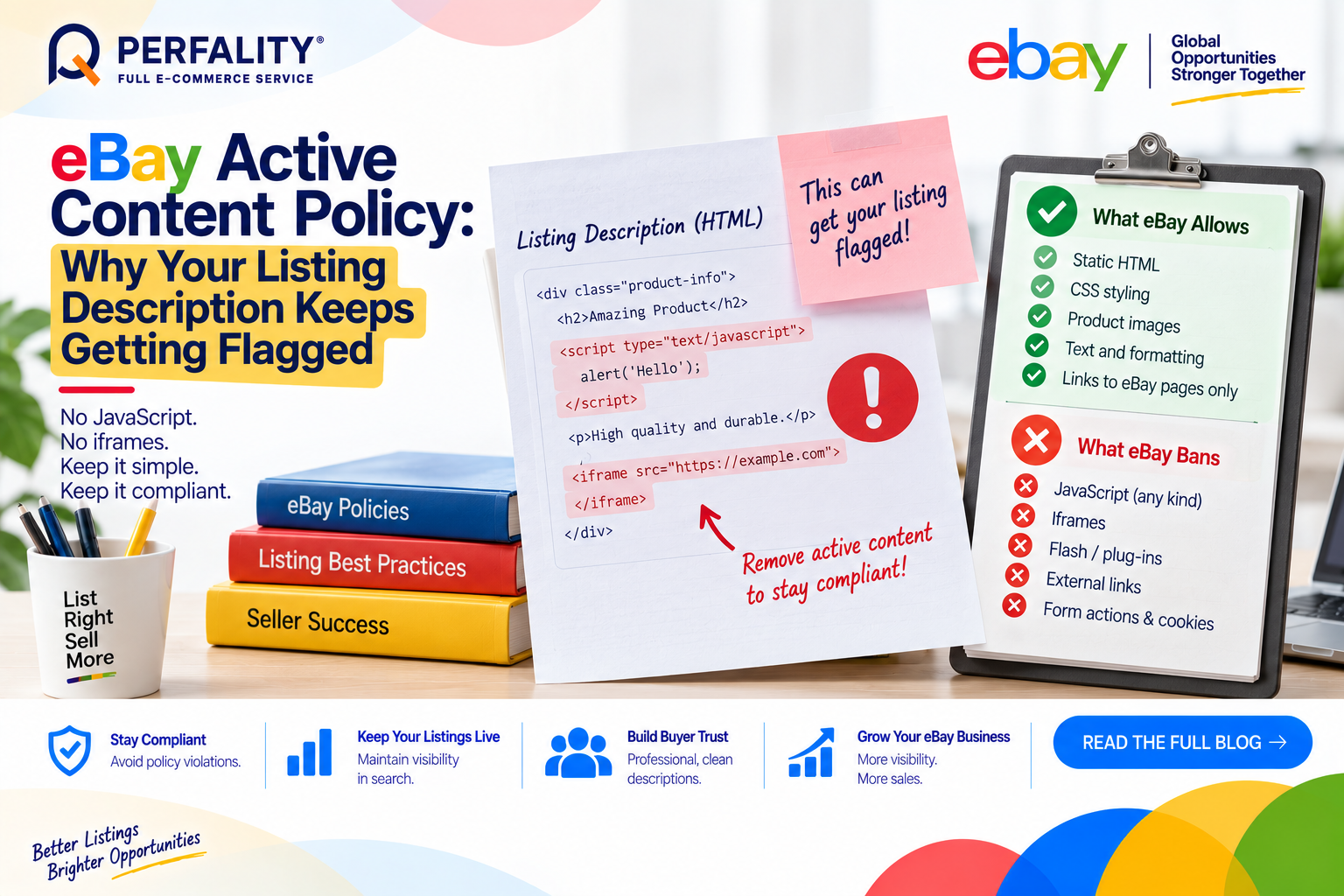
- JavaScript of any kind, including scrolling item pickers, embedded feedback widgets, social sharing icons, and currency conversion widgets.
- Flash, plug-ins, and form actions embedded in the listing description.
- Iframes, meta tags, and cookie-related scripts (.cookie*, cookie(, replace() — all flagged by eBay’s automated scanner.
- Any attempt to disguise the intention or function of source code using JavaScript, which eBay treats as a policy violation on its own.
What’s Commonly Misunderstood
The 2017 active content ban was widely misreported as a ban on listing templates entirely — it isn’t. Static HTML and CSS templates remain fully allowed and are used by thousands of professional sellers. The restriction is specifically on active, executable code, not on formatted, image-rich descriptions.
External links are a separate but related trap: eBay prohibits links to any destination outside eBay itself — no brand websites, no social media profiles — even when the linked content itself contains no active code.
A subtler issue: browser extensions like password managers can silently inject JavaScript (such as autofill helper scripts) into a description while it’s being edited, which then gets saved into the listing without the seller ever intentionally adding code.
How to Fix and Prevent Active Content Violations
- Run active listings through an active content checker periodically, not just when a new listing is created.
- Audit any third-party listing template for embedded scripts before adopting it, especially older templates built before 2017.
- Disable browser extensions that inject code (like some password managers) while editing listing descriptions.
- Remove all external links from descriptions — link only to eBay Store categories, the Store homepage, or other eBay listings.
How Perfality Approaches This
For eBay catalogs, description content is checked against the Active Content policy before publishing and on a recurring basis afterward. That includes:
- Pre-publish scanning: every listing description is checked for JavaScript, iframes, and disguised code before going live, not discovered after a flag.
- Template auditing: any third-party or legacy listing template is reviewed line by line for embedded scripts before being adopted for new listings.
- External-link removal: descriptions are checked to confirm every hyperlink points only to eBay destinations, never an external brand site or social profile.
- Periodic re-scanning: active listings are re-checked periodically, since code can get silently reintroduced through browser extensions or template updates after initial publication.
Related Services
If a listing keeps getting flagged for active content despite looking clean, the code is often hiding somewhere less obvious — a browser extension, a legacy template fragment — rather than something a quick manual scan will catch. A team that runs this check systematically across a catalog tends to find it faster than repeated manual review.
Depending on how you’re searching, this kind of support is also known by these names:
- Full-service Amazon management: Full Service Amazon Management, Full Service Amazon Agency, Amazon Full Service Agency, Full Service Amazon Marketing Agency, Best Full-Service Amazon Agency, Best Full Service Amazon Agency
- FBA-focused support: Amazon FBA Management Agency, Amazon FBA Agency, Amazon FBA Marketing Agency, Amazon FBA Management Service
- Listing and content optimization: Amazon Listing Optimization Services, Amazon Listing Optimization Agency, Amazon Listing Optimization Service, Amazon Product Listing Optimization Service, Amazon Product Listing Optimisation Service, Amazon Product Listing Optimisation Service USA
- Product listing services: Amazon Product Listing Service, Amazon Product Listing Service Provider, Best Amazon Product Listing Service Agency
- PPC and advertising management: Amazon PPC Management Service, Amazon PPC Management Service Agency, Best Amazon PPC Management Service, PPC Management Service For Amazon
- Account management: Best Amazon Account Management Services, Amazon Ecommerce Company
No. Only active, executable content – JavaScript, Flash, iframes, form actions – is banned. Static HTML and CSS templates remain fully allowed and are used by professional sellers.
No. eBay prohibits links to any external destination, including brand websites and social media profiles. Links must point only to eBay Store categories, the Store homepage, or other eBay listings.
Browser extensions, such as some password managers, can silently inject small scripts into a description while it’s being edited in certain browsers, which then get saved into the listing without the seller intentionally adding them.
If this is a recurring pain point rather than a one-off, it’s usually worth a quick conversation. Book a free 30-minute call with our team and we’ll walk through what’s actually happening on your account.
Have any questions? Let’s connect!

